Load your project once. Your editor, your tests and your AI agent all ask the same live session.
F# Interactive is amazing. SageFs is FSI that already has your project loaded. Edit a function, saved or not, and the affected tests re-run. Save a file and the running app serves the new code, with its state still there. Every binding is on screen, live. Each session gets its own host process, built with whichever SDK dotnet picks in your project's folder, so your package versions never fight mine. It's free, it's MIT, and it's one daemon.
installs with the .NET 10 SDK or the .NET 11 SDK · no config files · works on half-written code (source)
● Hot reload reaches into route tables that got built once at startup. That's the usual Falco/Giraffe/Saturn/Oxpecker setup, and it's what the demo below does. SageFS re-points the method, so a handler that gets called per request just reloads and the state you didn't touch stays where it is. How you start the app matters: one you start from FSI or an init script is patched in place by a detour, and one you start with run_app is patched in place by a metadata delta, the same call dotnet watch makes for C#. If the output was computed once at startup, you reshaped a type, or a run_app save needs something a delta can't take (a field added, a signature changed), you still need a restart, and SageFS tells you why. Live testing works across all five supported frameworks.
Save a file. The 0 below is the eval result. The right sidebar is the session: who's connected, what they're watching, and the next thing to try.
Hot Reload That Tells You The Truth
File watch → FSI eval → Harmony patch → SSE.
Save a file and SageFS re-points the running method with Harmony (source). Plain functions, functions in modules, static member bodies, and values bound straight to a lambda all reload in place, even when the route table was built once at startup (the usual Falco/Giraffe/Saturn/Oxpecker setup), and the state you haven't touched stays put. If you reshape a type, or change the type of a let mutable, that can't be patched, so SageFS says so and restarts, or asks for one. It patches the copy of a function your app is actually holding, including when a .SageFs/init.fsx #loaded your sources, on .NET 10 and .NET 11. An app you start with run_app runs in the worker, out of reach of a detour, so SageFS builds your project and hands the runtime a metadata delta, the same call dotnet watch makes for C#. The state stays put and a save comes back in a couple of seconds. A save the delta can't take (a field added, a signature changed) restarts the app and names the declaration. That path used to say Patched and change nothing. I caught it by editing the ticker demo and watching the output stay the same, and there's a test for it now. What each save did is also kept on the session, so your agent isn't left guessing: get_session_status carries a lastReload (patched, waiting to be seen running, never entered, restarted, kept a live value, no effect, restart required, or didn't compile, with the worker's own wording), and a push notification says it right after the save. For an app started with run_app, it reads Patched when the delta took the save and Restarted when it couldn't, which is the true answer either way. Getting the in-place part right meant reading the F# compiler's source. Turns out the Release optimizer was inlining small functions right out from under the patch, so SageFS builds your session without optimizations. The hot-reload docs have the full map.
Your Agent Gets a Real F# REPL
72 MCP tools, gated by session state.
SageFS runs a built-in MCP server with an affordance-driven state machine (source). Call a tool that doesn't fit the session's current state and it gets refused up front, so it doesn't blow up halfway through. Copilot, Claude, or any MCP client can evaluate F#, type-check it, and run the affected tests. It's the same REPL loop you use yourself, and a fast type-checked loop with tests re-running on every change is the best way I know to keep an agent from wandering off.
One Daemon, Every Maintained Client
Connect every client at the same time.
Start SageFS once. VS Code, Neovim, the Web Dashboard, and your AI agent all talk to the same daemon and the same session state at the same time. Each one keeps its own view, so the dashboard doesn't get yanked around every time another client switches sessions. I use this constantly.
See It Running
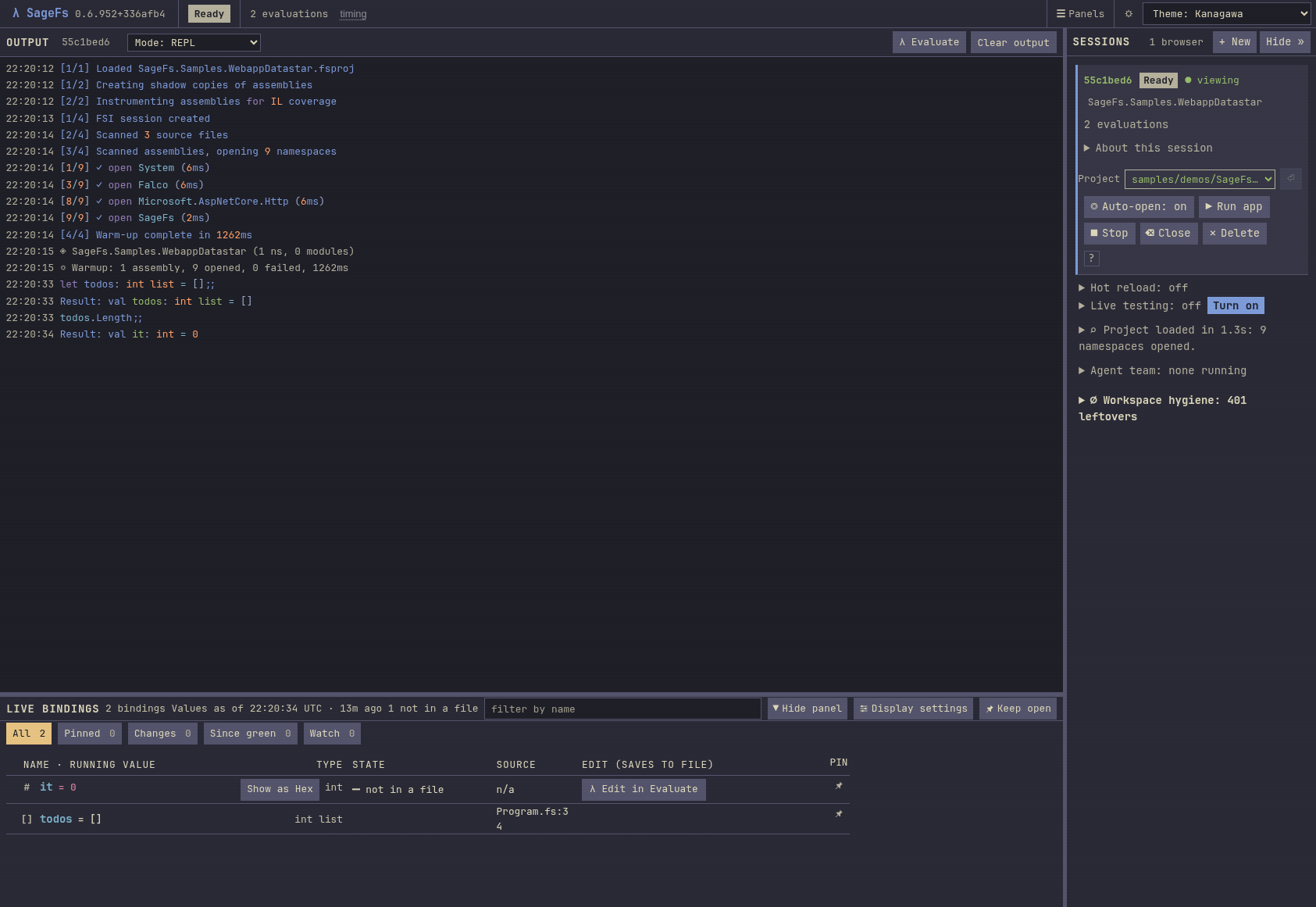
A live F# eval in the SageFS dashboard: a Falco/Datastar todo list, eval'd in milliseconds, with the session manager sitting right there on the side. One daemon, every editor.
The output panel is the last eval. The session card shows the browser that's connected, the project (SageFs.Samples.WebappDatastar), and what's loaded (9 namespaces, 2 live bindings).
Get Started
Prerequisite: the .NET 10 SDK or the .NET 11 SDK. The tool ships a build for each and dotnet picks the one that matches yours. You don't need anything else.
dotnet tool install --global SageFs
Install. One command, no config files.
Check (optional): sagefs check validates your SDK, FSI, project files, port, and daemon state.
Start the daemon: run sagefs and it brings up the service and the Web Dashboard. You don't need a project yet. Your editor, MCP client, or the dashboard creates sessions when you ask.
Connect through VS Code (Marketplace, Open VSX, or the .vsix from GitHub Releases), Neovim (sagefs.nvim), MCP (claude mcp add sagefs -- sagefs mcp, or your client's equivalent), or the Web Dashboard. Press Alt+Enter in an editor, or evaluate directly in the dashboard.
Three Workflows: REPL, Live Testing, Hot Reload
Every session picks one. The .NET runtime draws the line between REPL and Hot Reload. Once code is running, some things can be re-pointed in place and some just can't. The table says which is which.
REPL (default)
Live Testing
Hot Reload
Type redefinition
Full: redefine types freely
Full: redefine types freely
FS0037: expression-level changes only
Browser hot reload
Manual refresh required
Manual refresh required
Auto-refresh; function-body changes propagate in place, including startup-captured route tables and values bound straight to a lambda. A reshaped type, or a mutable whose type changed, restarts the app instead
Live testing
Available, you turn it on
On automatically when the session is ready: affected tests re-run on every edit from a connected editor
Available, you turn it on
Best for
Prototyping, domain modeling, exploration
TDD: tests re-run as you type
Web apps with Falco, Datastar, ASP.NET
Switch through the VS Code Command Palette (SageFs: Switch Workflow, the picker offers all three and marks which one you're in), the workflow dropdown on the dashboard, Neovim's :SageFsWorkflow (interactive, livetesting or hotreload, and with no name it opens a picker), or the switch_workflow MCP tool (accepts all three). VS Code, Neovim and the dashboard restart the same session in place. The MCP tool still creates a new session and stops the old one. I haven't unified those two paths yet. Either way, REPL-defined bindings are lost, but your files on disk are untouched.
Mental Model: Three Concepts
The daemon is a service. It starts bare, with no project and no session, and just listens. Clients tell it what to do.
Sessions are isolated. A worker process manages each session, and your F# actually runs in a separate host process that SageFS generates and builds with whichever SDK dotnet picks in that project's folder (your global.json pin if you have one, otherwise the newest SDK you've got installed), and runs on that SDK's runtime. Your package versions never collide with SageFS's. If an 11 preview is installed and you want a project on 10, pin it with global.json. Sessions can't interfere with each other. Create as many as you need.
Clients are thin. Editor plugins, the Web Dashboard, and AI agents are just windows onto the same daemon, each keeping its own viewing-session identity.
One daemon, every client: open full-screen (interactive: pan, zoom, focus, theme).
What You Get in Each Editor
Capability
VS Code
Neovim
Web Dashboard
AI (MCP)
Eval / inline results
✅
✅
✅
✅
Live diagnostics (SSE)
✅
✅
✅
✅
Hot reload control
✅
✅
✅
✅
Session management
✅
✅
✅
✅
Code completion
✅
✅
None
HTTP
Live test gutters
✅
✅
None
None
Coverage gutters
✅
✅
None
None
Debug a failing test
✅
✅
None
None
Failure narratives
✅
✅
✅
✅
Test panel
✅
✅
✅
✅
Type explorer
✅
✅
None
✅
None means nothing does it. HTTP means the editors reach it through a daemon route and no MCP tool does: completion is an F# Compiler Service call the editors make over HTTP. The editor columns say what's wired. Tests cover less than that.
Understanding the Gutter
Neovim draws these marks as signs in the sign column. VS Code draws the test marks at the end of the test's line and in the scrollbar's overview ruler, and the coverage marks as text in front of the code. The only icon VS Code puts in its own gutter is the Test Explorer run and debug glyph.
Icon
Meaning
✓ (green)
Test passing: covered by at least one passing test
✗ (red)
Test failing: a test covering this code has failed
○ (gray)
No coverage: no test exercises this line
│ (green bar)
Coverage healthy: all covering tests pass
│ (red bar)
Coverage degraded: some covering tests are failing
│ (gray bar)
Not covered: no test reaches this line
⊘
Inline failure: test name and Expected/Actual diff
The $3,000/year Feature, Free
Visual Studio Enterprise wants about $250/month per seat for Live Unit Testing. SageFS goes after that same loop with a REPL at the center, and it's free and MIT licensed. All five supported test frameworks discover, run, and report correctly today. On the small F# sample I measured, a verdict on an edited function's test arrives about 0.7 seconds after the edit leaves the editor, with no save and no rebuild. That's one machine and one small project, so I can't promise it for every one.
VS Enterprise Live Testing
SageFS
Speed
A build of a private copy of your repo for every edit
About 0.7 s from edit to verdict on one small F# sample
Isolated FSI Host: each session's F# actually runs in a separate host process that SageFS generates and builds with the target project's own .NET SDK, talking back to the worker over loopback TCP. Nothing from SageFS is referenced by that host, so your project's package versions (including its own copy of Harmony) can never collide with SageFS's own (source). Each host also launches on the .NET runtime version its project needs.
Hot Reload: file changes are detected, the changed functions are diffed against the source the loaded assembly was built from and emitted against the compiled module's own identity, and Harmony re-points those methods at runtime, inside the isolated host itself (source). This reaches a route table captured by value at startup (Falco, Giraffe, Saturn, Oxpecker) too, because the captured route still dispatches through the handler's method entry point. A value computed once at startup that something has already handed on, a mutable whose type changed, or a reshaped type restarts the app instead, while a mutable you didn't touch keeps its live value. An app started with run_app runs in the worker, so a save there goes in as a metadata delta. Connected browsers auto-refresh via SSE/DevReload either way (source).
Multi-Session: multiple isolated F# sessions simultaneously, each with its own worker sub-process, isolated FSI host, project, and file watcher.
MCP Tools: 72 tools grouped by purpose (execution, sessions, testing, analysis, export, friction, leases, workspace hygiene, cohort coordination) and gated by session state. Call one that doesn't fit the current state and it's rejected before it runs (full list).
SSE Events: editors receive test_source_locations, file_annotations, and failure_narratives tagged with SessionId.
Architecture: a daemon-first design. The daemon spawns a worker sub-process per session, and the worker launches the isolated FSI host where your code actually runs, plus one authoritative Web Dashboard and per-client viewing-session identity.
Spawn-First Restart: hard resets start a replacement worker before stopping the old one, so the session keeps serving during the cold start.
Binary Persistence: the daemon's session manifest and per-project test caches persist to compact, CRC-32C-checked binaries (.sagefm and .sagetc) for near-instant cold starts (source).
Supervised Mode: Erlang-style watchdog with exponential backoff (sagefs --supervised) for crash-proof all-day runs (source).
Repository map
Where things live in the SageFS repo:
SageFs.Core/: the shared engine (session management, MCP/session operations, live testing, persistence, rendering primitives)
SageFs/: CLI entrypoint, daemon, MCP server, Web Dashboard, and worker HTTP transport
SageFs.Host/: the worker sub-process every session spawns. SageFs.FsiHost/: source for the isolated FSI host, built fresh with each project's own SDK
SageFs.Simulation/: deterministic simulation models that fold the real cores (file-reload routing, worker lifecycle, supervision, the manifest)
SageFs.Tests/: main Expecto suite; the repo's test-count badge is auto-derived from the live suite (13,000+ cases)
sagefs-vscode/: VS Code extension (F# via Fable)
docs/: guides, deep dives, technical reference
samples/: runnable .fsx demos and language-onramp projects, including Raylib application and game demos, whose hot reload is not covered by an automated test
Troubleshooting
Problem
Quick Fix
Daemon not found
dotnet tool install --global SageFs, then sagefs status
Port already in use
sagefs stop, or set SAGEFS_MCP_PORT=8080 for the daemon you want to keep. --mcp-port 8080 alone is refused: a daemon off the default port has to name its owner with --owner-pid or when to give up with --ttl
Wrong project selected
SageFs: Switch Project in command palette
Stale REPL after changes
Save the file first. Source edits auto-reload. Hard reset only for .fsproj / package changes.
Results don't match the code you just wrote
Your daemon is older than your code. sagefs status shows when it started; restart it. A hard reset won't help.
Full troubleshooting and the complete MCP tool reference live in the documentation.
It's early days and I'm building this in the open, so you WILL find rough edges. Tell me about them. Hit me up on Discord (same name there) or open an issue on GitHub.